

Stores and retail
Intelligence for stores and retail
Understand how customers move through your store and turn data into better business decisions.
With Blucom solutions, your store can track visitor flow, identify the busiest hours, analyze occupancy and better understand how people circulate, using artificial intelligence and compatible cameras.
Customer counting in retail
How to know how many customers enter your store
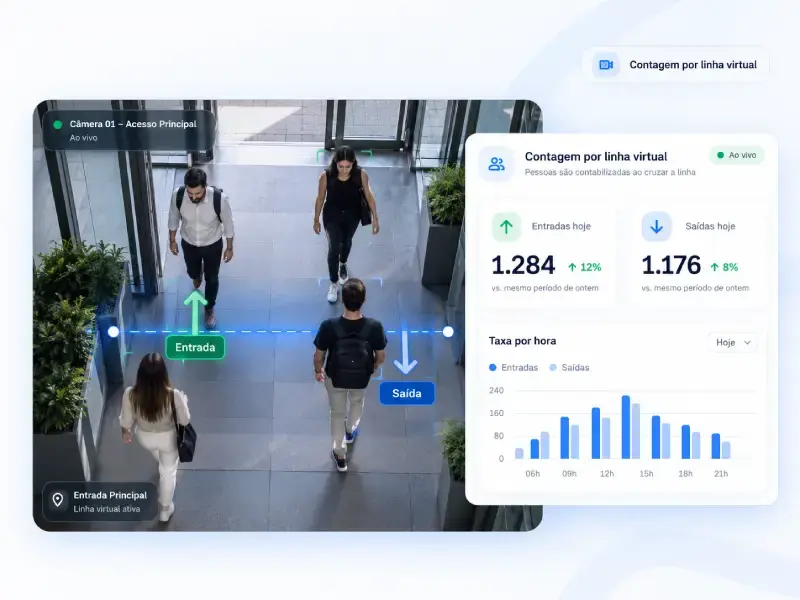
To count store customers, Blucom uses IP cameras at the entrances and artificial intelligence: each person who crosses the virtual line drawn on the image is recorded as an entry or exit. The data appears in a dashboard, with traffic by hour, by day and comparisons between periods.
For this use, Blucom offers Blucount, a standardized people counter with defined plans and assisted deployment, with no custom project required. Discover Blucount
Who it is for
- Street stores
- Stores in shopping malls
- Retail chains and franchises
- Clothing, footwear and accessories stores
- Supermarkets and convenience stores
- Pharmacies and similar businesses
- Other physical stores that want to understand customer traffic
Store traffic
Get to know your store traffic
Without data, the store relies on the team’s perception to know how many people came in, when traffic increases and whether a campaign brought more visitors.
Visitor counting
Know how many people enter and leave the store and follow traffic throughout the day.
Busiest hours
Identify peak periods and use this information to support decisions about staff, service and opening hours.
Period comparison
Compare days, weeks and months to understand seasonality, trends and the results of commercial actions.
Dwell time
Analyze how long people stay in monitored areas, according to the technical conditions of each space.
Analytics and Intelligence plans
Real-time occupancy
See how many people are in the store, as long as the entrances are properly covered by the cameras.
Analytics and Intelligence plans
Multiple locations
Each store is registered as a location in the same dashboard, with the same indicators, making it easier to follow traffic across a chain.
Commercial management
Data that helps you sell better
Knowing how many people enter the store helps evaluate results and plan operations based on numbers rather than estimates.
- Evaluate traffic during campaigns, promotions and holidays
- Compare weekdays and weekends
- Plan staff schedules according to peak hours
- Analyze traffic across different stores in the chain
- Identify low-traffic periods for commercial actions
- Support tracking of the sales conversion rate
What about the conversion rate?
Blucount provides the number of visitors. The sales conversion rate also depends on the number of sales or receipts, which comes from the store’s sales system or other records. With both numbers, the store calculates conversion for the period. Blucount has no native integration with POS systems.

Featured product
Blucount: AI people counter
A ready-made solution for stores that need to measure customer traffic without developing a custom project.
- Uses compatible IP cameras
- Standardized dashboard
- Real-time and historical indicators
- Defined plans and pricing
- Deployment assisted by Blucom
- Remote setup whenever technically possible
- Deployment target of up to 5 business days once technical requirements are met and equipment is available
Plans, requirements and commercial conditions are on the Blucount page.
Other solutions
Other Blucom solutions for retail
When the need goes beyond customer counting, other Blucom products can complement the operation.

Bluflow: checkout queues and waiting time
For supermarkets, cash-and-carry stores, pharmacies and stores with recurring queues, Bluflow monitors queues and waiting time at checkouts and service points and helps identify bottlenecks at peak hours.
Discover Bluflow
Blumaps: maps and wayfinding in large stores
For large stores such as hypermarkets, cash-and-carry stores and home centers, digital maps and routes help customers find departments, products and services.
Discover Blumaps
Blutrack: custom video analytics
For projects beyond Blucount’s standard features, such as custom indicators, vehicle counting in parking lots or special integrations.
Discover BlutrackHow to start
From first contact to your store indicators
A simple process, with Blucom supporting every technical step.
- 1
Share your need
Tell us the type of store, the entrances you want to monitor and the number of cameras.
- 2
Technical assessment
Blucom assesses the cameras, internet connection and existing infrastructure and points out anything needed.
- 3
Plan choice
You choose the most suitable Blucount plan: Fluxo, Analytics or Intelligence.
- 4
Assisted deployment
Blucom configures the cameras, counting lines and dashboard and validates everything with you.
- 5
Tracking
The store starts following entries, exits, peak hours and comparisons in the dashboard.
Each store goes through technical validation. In some cases, camera positioning needs adjusting or additional equipment must be installed.
FAQ
Questions about counting customers in stores
How do I count how many people enter my store?
With IP cameras at the entrances and an AI people counter such as Blucount. The AI records each person who crosses the virtual line drawn on the image as an entry or exit, and the data appears in a dashboard.
Can I use the cameras I already have?
Yes, as long as they are compatible IP cameras with RTSP streaming and are well positioned at the entrances. Blucom validates each camera before activation.
Do I need to buy additional equipment?
Not necessarily. Compatible cameras already installed can be used. If infrastructure is missing, Blucom recommends and quotes the cameras or equipment needed, such as a pre-configured MikroTik router for the secure connection.
Do I need a static IP address?
No. The secure VPN connection does not require a static IP or inbound open ports on the store internet connection.
Can I follow traffic in real time?
Yes. Entry and exit counts are updated in real time in the dashboard on all Blucount plans. Real-time occupancy is available on the Analytics and Intelligence plans.
Can I compare traffic on different days?
Yes. The dashboard includes history and comparisons between days, weeks and months, as well as peak days and hours.
Does Blucount work for store chains?
Yes. Each store is registered as a location in the same dashboard, with the same indicators. Standard deployment is charged per location and the monthly fee per camera.
Can I calculate the visitor-to-buyer conversion rate?
Blucount provides the number of visitors, which is the basis of this calculation. The number of sales comes from the store system or other records. Blucount does not calculate conversion automatically and has no native POS integration.
How much does a store people counter cost?
Blucount has a monthly fee per camera, with Fluxo, Analytics and Intelligence plans, and a standard deployment fee per location. Talk to Blucom for a proposal for your store.
How does deployment work?
Blucom validates the cameras and connectivity, configures the counting lines and the dashboard, remotely whenever possible, and grants access. The target is up to 5 business days once technical requirements and the necessary equipment are available.
Want to know how many customers enter your store?
Discover Blucount or talk to Blucom to assess your cameras and the best plan for your business.